Every insurance device technician has a version of the same problem. They can diagnose a water-damaged iPhone in ninety seconds. They can tell you whether a laptop screen crack is cosmetic or structural before the customer finishes explaining what happened. The assessment is fast. The writing is not.
For Connect NZ, an insurance device repair and assessment company processing claims for IAG, Vero, and Tower, every assessment generated a technical report. That report needed to be detailed enough for the insurer to authorise a repair or replacement, professional enough to withstand scrutiny, and consistent enough that it did not matter which technician wrote it. The assessment itself took minutes. The report writing took 15 to 30 minutes per claim. Across hundreds of weekly claims, the writing was silently consuming more capacity than the actual technical work.
We integrated OpenAI's API directly into Connect NZ's FileMaker Pro ERP system. Not as a separate tool. Not as a dashboard they had to switch to. As a native feature inside the system they already used every day. The result was AI report writing automation that turned technician shorthand into professional, insurer-ready documents in under three minutes, with consistent quality regardless of who entered the notes.
Why were insurance technicians spending more time writing reports than assessing devices?
Insurance device technicians at Connect NZ spent 15 to 30 minutes writing each technical assessment report manually, despite the actual device assessment taking only minutes. Report quality varied significantly between technicians, with experienced staff producing thorough documentation while newer team members wrote bare-minimum notes that often required senior review and rewriting. This writing bottleneck silently consumed hours of skilled technician time daily across hundreds of weekly claims.
The problem was not that technicians could not write. Most of them could articulate exactly what was wrong with a device and why. The problem was the translation layer. A technician's natural output is shorthand. "Screen cracked top-right, LCD bleed visible, touch responsive below crack line, housing intact, no water indicators triggered." That is a complete technical assessment in 18 words. An insurer needs three paragraphs.
Insurance partners like IAG, Vero, and Tower require reports that follow a specific structure. Device identification. Damage description. Functional assessment. Repair feasibility analysis. Recommendation with justification. Each section needs to be written in professional language that a non-technical claims handler can understand and act on. The gap between what a technician naturally produces (concise technical shorthand) and what an insurer needs (structured professional prose) is where the time went.
 The gap between technician shorthand and insurer-ready documentation consumed 15 to 30 minutes per claim in manual writing time.
The quality variance compounded the cost. Connect NZ's experienced technicians had learned, over years, how to write reports that satisfied insurer requirements. They knew the terminology. They knew the structure. They knew which details mattered and which were noise. A senior technician's report went straight to the insurer without revision. A newer technician's report often came back for rewriting, which meant a senior person was spending their time editing someone else's work instead of doing their own assessments.
The arithmetic was brutal. At 15 to 30 minutes per report, a technician processing 10 claims per day spent two to five hours writing. That is half a working day, or more, spent on documentation rather than the diagnostic work they were hired and trained to do. Multiply that across a team of technicians and hundreds of weekly claims, and the aggregate writing labour represented a significant portion of the company's total operational capacity.
Customer communication had the same problem at a different scale. Emails and SMS messages to policyholders needed to be professional, clear, and consistent. But the quality depended entirely on who was on shift. One staff member might send a well-structured update. Another might send a two-line message that left the customer with more questions than answers. There was no template that covered every scenario, and the scenarios were too varied for a fixed template approach to work.
Google review responses added a third vector. Every business knows that responding to reviews matters. But crafting a professional, appropriate response to each review takes time that customer service staff did not have in a busy claims operation. Reviews went unanswered for days, or received generic responses that read as though no one had actually read the review.
The cumulative picture was a business where skilled people spent a disproportionate amount of their day producing text, not because the text was unimportant, but because the process of producing it was inefficient relative to the expertise required.
How does OpenAI turn technician shorthand into insurer-ready reports inside FileMaker Pro?
The OpenAI API integration embeds AI-powered report generation directly into Connect NZ's FileMaker Pro ERP system, enabling technicians to enter brief assessment notes in their natural shorthand and receive a structured, professional technical report generated in seconds. Three distinct use cases were built as native FileMaker features: technical report generation, customer response drafting, and review response creation, each with custom prompts tailored to insurance industry requirements.
The architectural decision that defined this project was where the AI lived. We did not build a separate application. We did not create a web portal that technicians would need to switch to. We embedded the OpenAI API calls directly into FileMaker Pro, the system that Connect NZ's entire operation already ran on. Job management, claims tracking, customer communication, technician workflows. Everything lived in FileMaker. The AI needed to live there too.
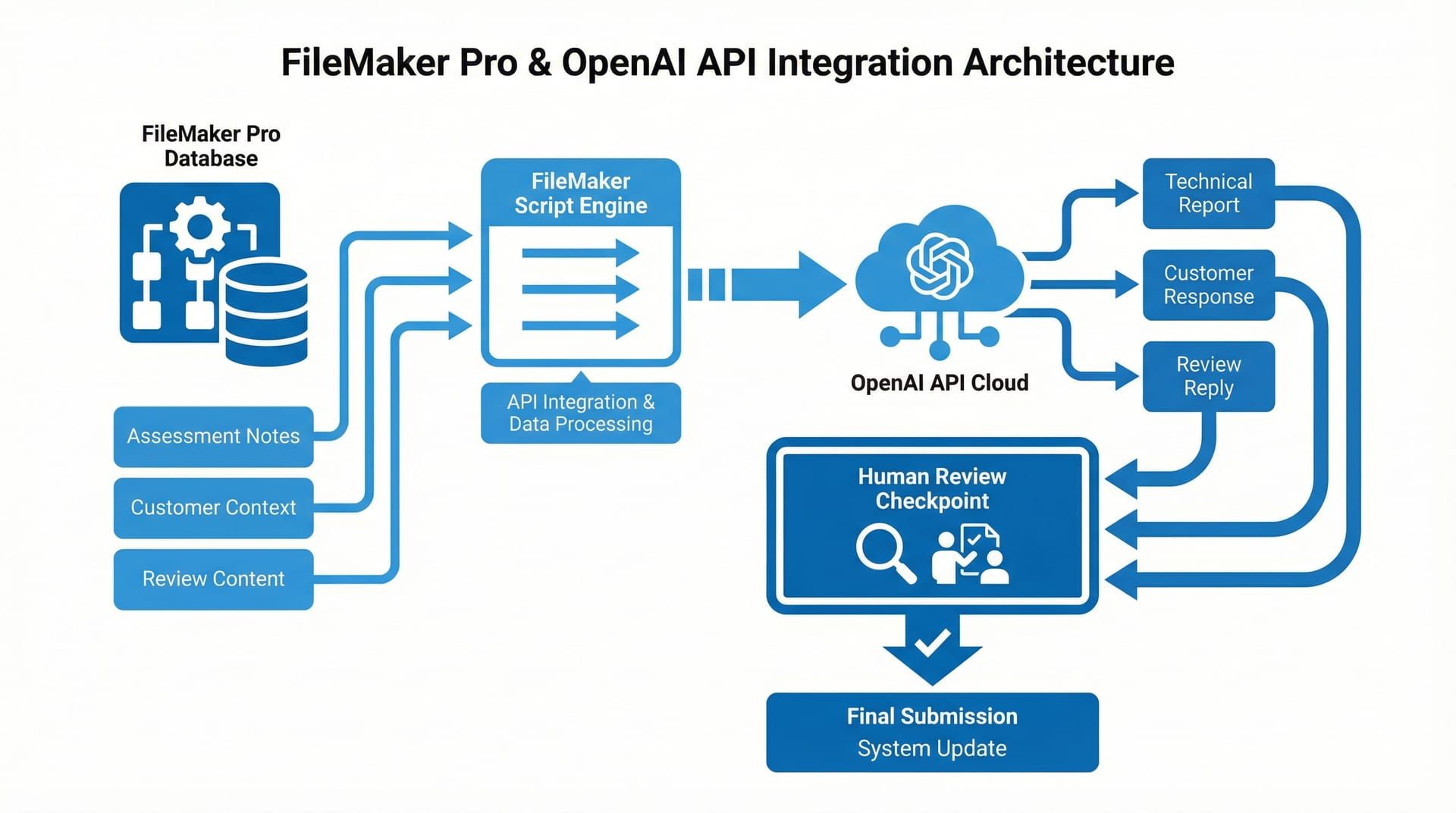 The integration added AI capabilities as native FileMaker features, not as a separate tool. Technicians never leave their existing workflow.
We started from the output and worked backward. The output for technical reports was a structured document with specific sections that insurers expected: device identification, damage assessment, functional testing results, repair feasibility, and recommendation. Working backward, we needed a system prompt that understood insurance terminology, knew the expected report structure, and could expand technician shorthand into professional prose without inventing information that was not in the original notes.
How do custom system prompts maintain insurance-grade consistency?
Each of the three use cases (technical reports, customer responses, review responses) uses a distinct system prompt engineered for its specific context. The technical report prompt enforces the insurer-expected report structure, expands abbreviations and shorthand into professional language, and maintains strict factual boundaries so the AI never fabricates details beyond what the technician provided. This prompt engineering is what ensures every generated report reads as though a senior technician wrote it.
The system prompts were not generic. They were built from real examples of Connect NZ's best reports, the ones written by senior technicians that went straight to insurers without revision. We reverse-engineered what made those reports effective: the structure, the terminology, the level of detail, the way damage was described in relation to repair feasibility. Those patterns became the prompt instructions.
For customer communication, the prompt handled a different challenge. Customer responses needed to convey status updates, explain processes, and manage expectations, all in a tone that was professional without being cold. The prompt included instructions for tone calibration: empathetic for delays, clear for next steps, straightforward for status updates. Staff selected the context (claim status, next action, any issues) and the system drafted a response matching that context.
Review responses required a third prompt personality. Professional, appreciative for positive reviews, constructive and non-defensive for negative ones. The prompt ensured responses acknowledged the specific content of the review rather than producing generic "thank you for your feedback" language that customers can spot from across the internet.
How does the FileMaker Pro integration work technically?
The integration uses FileMaker's native scripting engine to construct authenticated API calls to OpenAI's endpoints. When a technician triggers report generation, a FileMaker script collects the assessment notes from the current record, packages them with the appropriate system prompt, sends the request to the OpenAI API, and writes the response directly back into the report field on the same layout. The entire round trip typically completes in under 10 seconds.
The FileMaker script handles authentication, request construction, error handling, and response parsing. If the API call fails (network issue, rate limit, authentication error), the script surfaces a clear error message and logs the failure. The technician can retry or write manually. There is no scenario where a failed API call blocks the workflow.
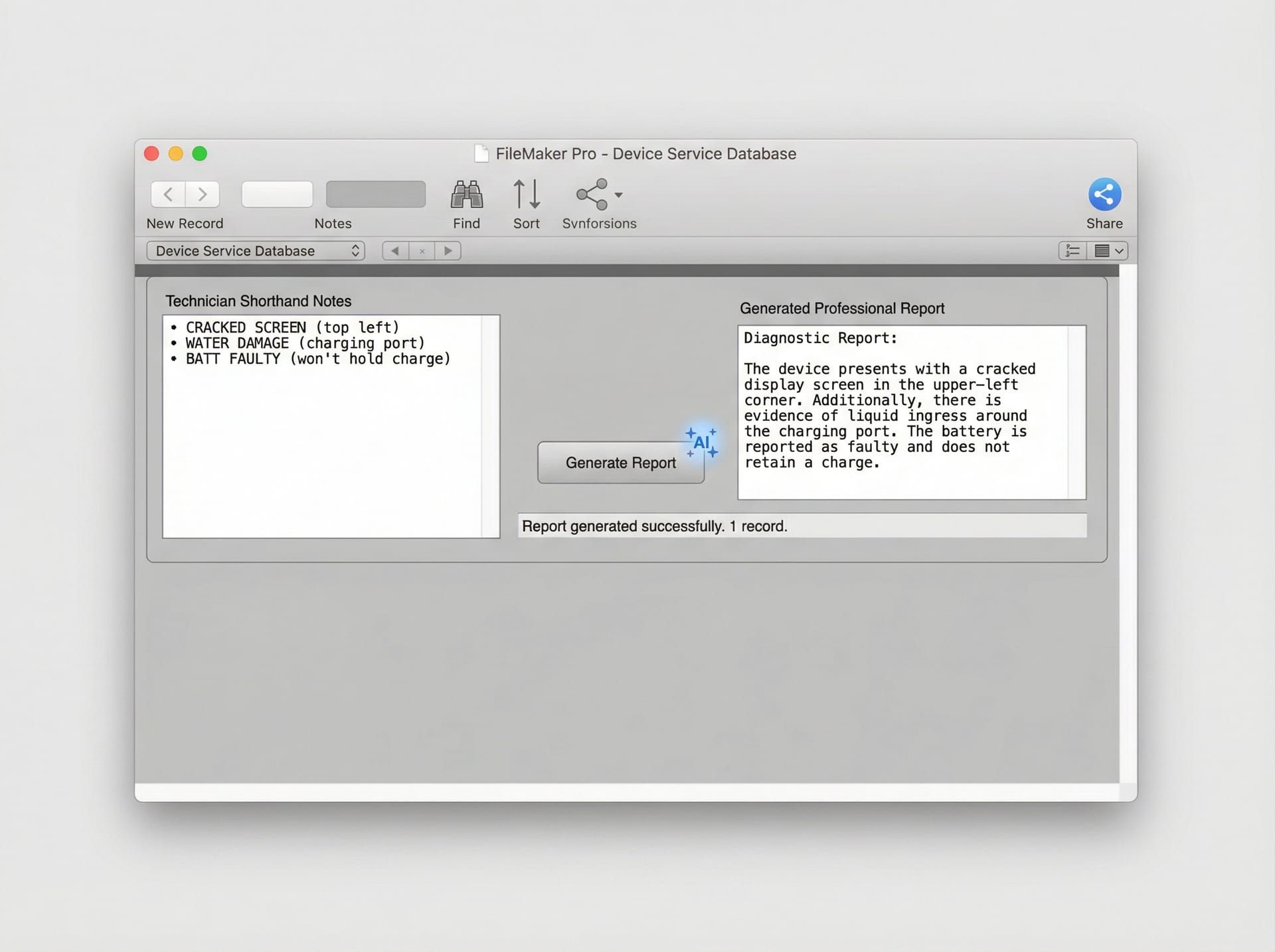 The technician enters assessment notes in their natural shorthand. One button press generates a structured professional report. The technician reviews and edits before sending.
Every generated report is presented for human review before it goes anywhere. This was a non-negotiable design principle. The AI drafts. The human approves. The technician reads the generated report, makes any corrections or additions, and then submits it. This is augmentation, not automation. The technician's expertise remains the authority. The AI handles the translation from shorthand to structured prose.
This human-in-the-loop approach served two purposes. First, it maintained quality assurance. AI-generated text can occasionally misinterpret shorthand or produce a phrasing that does not quite fit the specific damage scenario. The technician catches these because they have the device in front of them. Second, it maintained trust. Both with the technicians (who needed to feel their expertise was respected, not replaced) and with the insurance partners (who needed assurance that reports were reviewed by qualified assessors).
What happened when the AI report generation went live?
When the OpenAI integration was deployed into Connect NZ's FileMaker Pro system, technical report writing time dropped from 15 to 30 minutes per claim to 2 to 3 minutes. Every report, regardless of which technician entered the notes, came out at the quality level previously achieved only by the most experienced staff. Customer response quality became consistently professional across all shifts, and review response turnaround dropped from days to minutes.
The first week was telling. Technicians who had been spending half their day on report writing were finishing their documentation in a fraction of the time. The reports were not just faster. They were better. More structured. More consistent. The kind of documentation that insurer partners could process without follow-up questions. Newer technicians produced reports indistinguishable in quality from those of staff with years of experience, because the AI applied the same structural and linguistic standards regardless of input.
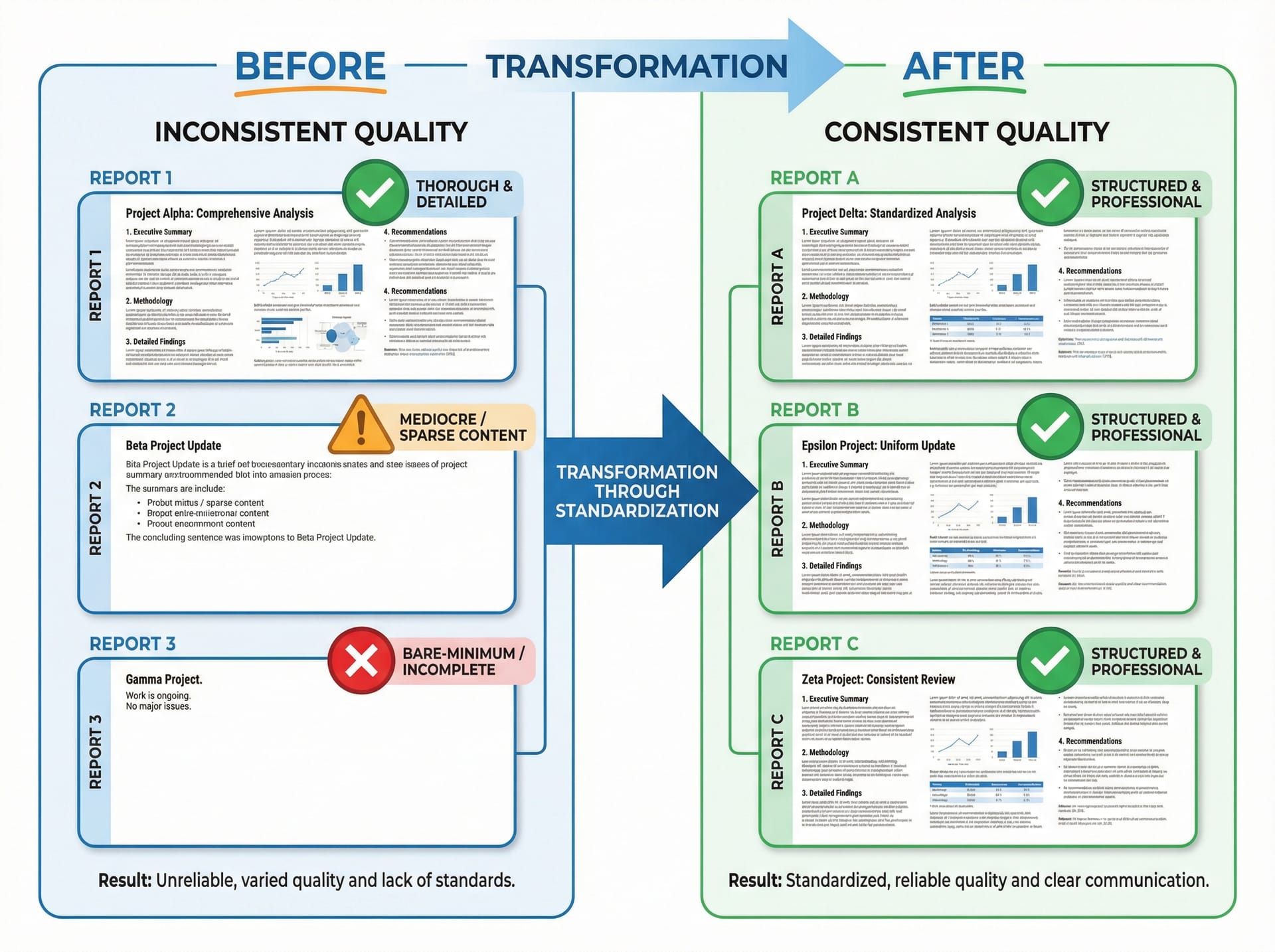 The same assessment notes produce dramatically different outputs. Manual reports varied in quality. AI-generated reports maintained consistent professional standards.
The time recovery was the most tangible result. Two to five hours per day per technician, returned to actual device assessment work. For a team processing hundreds of claims weekly, that recovered capacity was substantial. Technicians did more assessments per day because the writing bottleneck was gone. The throughput increase did not require hiring additional staff. It required removing the task that was wasting the staff they already had.
Customer communication quality levelled up across the board. The inconsistency between shifts disappeared. Whether a policyholder received an update at 9am from one staff member or at 4pm from another, the communication was professional, clear, and complete. This consistency is difficult to achieve through training alone because the variance is not about competence. It is about the natural variation in how different people write under time pressure. The AI provided a consistent baseline that staff could then personalise as needed.
Review responses, previously an afterthought, became a managed process. Responses went out within hours rather than days. Each response addressed the specific content of the review. The business's online presence became more actively managed without adding headcount to do it.
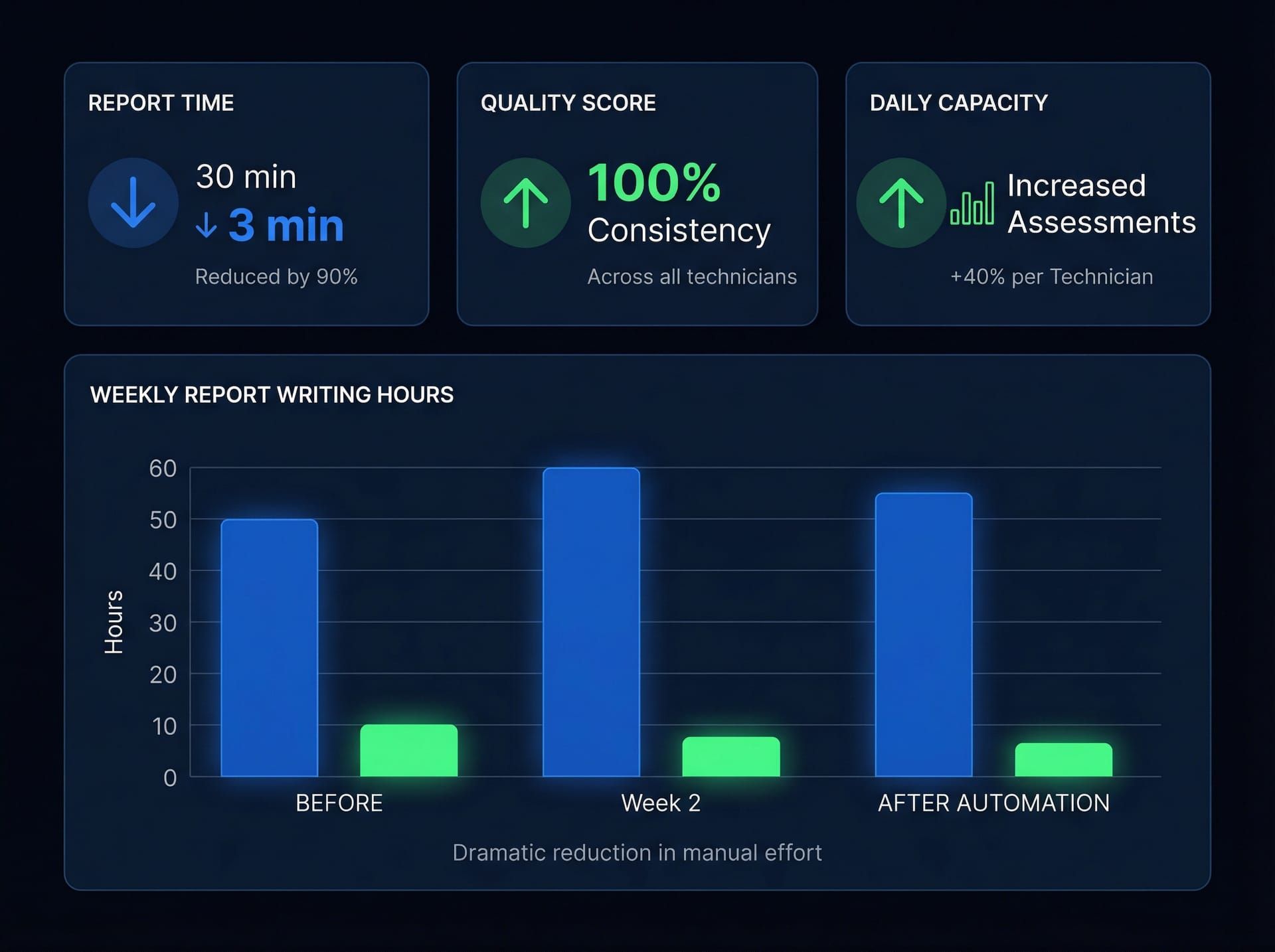 Report generation time, quality consistency, and customer response turnaround all improved measurably from the first week of deployment.
The deeper outcome was a shift in how technicians experienced their workday. They were hired to assess devices. They were trained to diagnose problems. Before the integration, a significant portion of their day was spent on a task that felt like overhead: translating their expertise into prose. After the integration, they spent their time doing the work they were good at and the AI handled the translation. That shift in daily experience matters. It affects retention, job satisfaction, and the quality of the diagnostic work itself, because a technician who is not dreading the report they have to write after each assessment approaches the assessment with more focus.
This project was one of several we delivered for Connect NZ, building on the same FileMaker Pro infrastructure that powered the Email-to-XML claims automation, the IMEI verification integration, and the virtual device assessment platform. Each project addressed a different bottleneck in the same claims operation, and each was embedded directly into the tools people already used. That principle, meeting people where they work rather than asking them to go somewhere new, is central to how we approach AI integration consulting at EmbedAI.
What technology powers the OpenAI FileMaker Pro integration?
OpenAI API (GPT Models) — Large language model powering all three generation use cases: technical report writing, customer response drafting, and review response creation. Custom system prompts for each use case ensure consistent tone, terminology, structure, and factual boundaries tailored to insurance industry requirements.
FileMaker Pro — Existing ERP system serving as the integration host. FileMaker scripts handle API request construction, authentication, response parsing, and field population. All AI features are native FileMaker interface elements, requiring no workflow changes from technicians or customer service staff.
Custom System Prompts — Three distinct prompt configurations engineered from real examples of Connect NZ's best human-written reports and communications. Each prompt enforces specific structural requirements, professional language standards, and factual boundaries appropriate to its use case.
Human-in-the-Loop Review — All AI-generated content is presented for human review and editing before submission. Technicians approve and can modify generated reports. Customer service staff review and personalise generated responses. No AI-generated text reaches an insurer or customer without human sign-off.
Error Handling and Fallback — API failure handling ensures the workflow is never blocked. Network errors, rate limits, and authentication failures are caught, logged, and surfaced to the user with a retry option. Manual writing remains available as a fallback at all times.
FAQ
Can OpenAI be integrated into FileMaker Pro for business automation?
Yes. FileMaker Pro's native scripting engine supports authenticated HTTP requests to external APIs, including OpenAI's. The integration pattern involves constructing API requests within FileMaker scripts, sending them to the OpenAI endpoint, parsing the JSON response, and writing results back to FileMaker fields. This enables AI-powered features like report generation, response drafting, and data summarisation to be embedded directly into existing FileMaker workflows without requiring users to leave the system.
How does AI improve insurance technical report writing quality?
AI report generation applies consistent structural and linguistic standards to every report, regardless of which technician enters the assessment notes. Custom prompts enforce the specific format, terminology, and detail level that insurance partners require. The result is that every report meets the quality bar previously achieved only by the most experienced staff. Reports are always reviewed by a qualified human assessor before submission, maintaining the expertise layer that insurers trust.
Does AI report generation replace insurance technicians?
No. The AI handles the translation from technical shorthand to structured professional prose. The technician remains the diagnostic expert who assesses the device and determines the findings. They enter their observations, the AI generates a draft report, and the technician reviews and approves it before submission. This augmentation model preserves human expertise while eliminating the time-consuming manual writing step. Technicians spend more time assessing and less time writing.
What is the ROI of AI report writing automation for insurance claims processing?
For Connect NZ, report writing time dropped from 15 to 30 minutes per claim to 2 to 3 minutes, recovering two to five hours of technician time per day. That recovered capacity went directly into additional device assessments without hiring more staff. Customer response consistency improved across all shifts, and review response turnaround dropped from days to minutes. The integration cost was a fraction of the annual labour cost it displaced. Contact EmbedAI to discuss AI automation for your claims operation.
Can EmbedAI integrate AI into our existing business systems?
Yes. EmbedAI specialises in embedding AI capabilities directly into the systems businesses already use, whether that is FileMaker Pro, a web application, or a custom ERP. Our approach prioritises adoption by meeting users where they work rather than introducing new tools. Our services include AI integration consulting, custom prompt engineering, and workflow automation for New Zealand businesses across insurance, trades, and professional services.