Commercial Joinery Wellington runs four operational teams: Joinery, Cabinetry, Office, and Install. Each team has its own workflow, its own scheduling pressures, and its own idea of what "busy" looks like. The business uses Simpro as its job management system, which tracks jobs, schedules, and staff assignments. But Simpro was not built to answer the question the management team asked most often: can we take on more work this week?
That question requires synthesising information across teams, factoring in leave, understanding which days are already committed, and comparing against total capacity. In Simpro, getting that answer meant opening multiple screens, cross-referencing calendars, and doing mental arithmetic. It was slow and unreliable, particularly when quoting new jobs with tight timelines.
They wanted a single screen that showed capacity at a glance. We built it.
What does the calendar show?
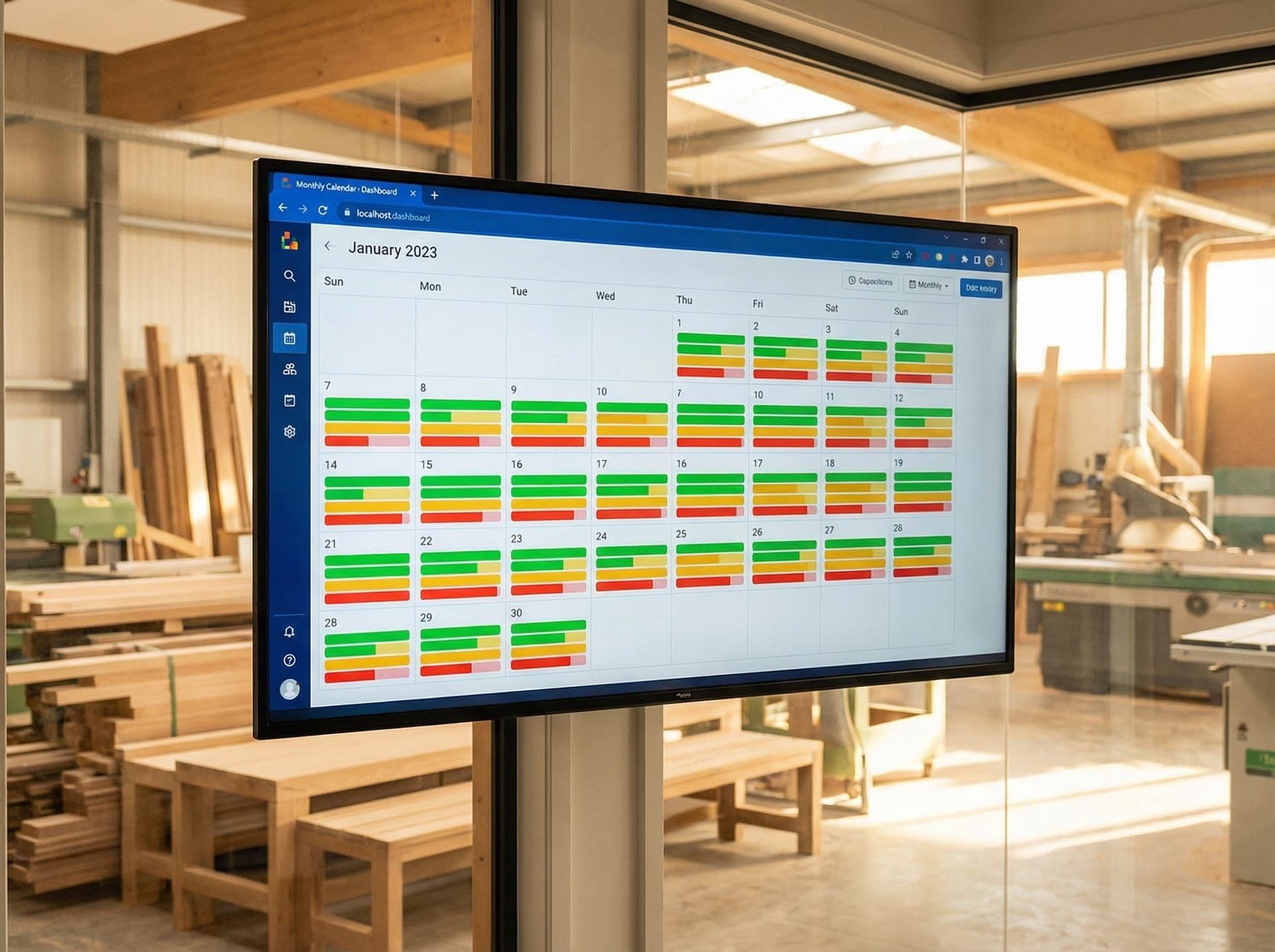
The application presents a monthly calendar view where each day is colour-coded by capacity status. Green means the team has significant availability. Amber means capacity is limited. Red means the day is fully committed or overcommitted. The thresholds are configurable per team, because "busy" for a four-person install crew means something different than "busy" for an eight-person joinery workshop.
Below the colour indicator, each day shows a breakdown bar split by team. At a glance, the operations manager can see that Wednesday has plenty of joinery capacity but the install team is booked solid. This is the information that drives quoting decisions: if a new kitchen job needs install time next week and the install bar is red across all five days, the quote goes out with a longer lead time.
Clicking any day opens a detail modal showing exactly who is scheduled, what jobs they are on, and how many hours are allocated versus available. This drills down from the strategic overview (can we take work?) to the tactical detail (who specifically is free?).
How does it handle leave and holidays?
Leave was one of the trickier aspects. Capacity is not just about job allocation. A team might have no jobs scheduled on a Friday but also have three people on annual leave, making it a poor day to schedule new work.
The system imports leave data from Simpro and factors it into the capacity calculation automatically. Annual leave, sick leave, and other absence types all reduce the available hours for that team on that day. The calendar reflects this in real time — if someone calls in sick and it is recorded in Simpro, the capacity view updates on the next refresh.
New Zealand public holidays required specific handling. The application includes the full NZ public holiday calendar, including regional anniversary days and Matariki, which shifts date each year. Holidays are highlighted on the calendar and reduce team capacity to zero (or whatever the business rules specify for that day), preventing anyone from accidentally quoting work that assumes a full team on a public holiday.
What was the technical approach?
The application is a Next.js web application deployed on Vercel. It connects to Commercial Joinery's Simpro instance through the Simpro REST API, pulling job schedules, staff assignments, and leave records.
API performance was a real constraint. Simpro's API returns detailed job data but is not optimised for the kind of aggregate queries a capacity view requires. Pulling a month of schedule data for all staff across all teams involves multiple API calls, and doing this on every page load would be both slow and wasteful of API rate limits.
The solution was an intelligent caching layer. The application caches API responses and refreshes them on a schedule that balances data freshness against API load. Job schedule data refreshes more frequently than leave data (which changes less often). The cache invalidation logic ensures that when someone opens the calendar, they see data that is at most a few minutes old without hammering the Simpro API on every request.
State management uses Zustand, which keeps the client-side interactions fast. Filtering by team, switching between months, and opening day detail modals all happen instantly because the data is already in memory. FullCalendar handles the calendar rendering, with custom day cell components that display the capacity indicators and team breakdown bars.
How is access controlled?
The application contains sensitive operational data — staff schedules, capacity levels, job details. It is not something that should be publicly accessible. Rather than implementing a full authentication system (which would have added complexity and ongoing user management overhead for a small team), the application uses IP-based access protection.
Only requests originating from Commercial Joinery's office network and a whitelist of approved IP addresses can access the application. Requests from other IPs receive a generic error page. This gives the team instant access from any device on the office network without login credentials, while keeping the data private.
For a small business with a single office location, this is a pragmatic trade-off. It eliminates password management, reduces support requests, and provides a level of access control that matches the actual risk profile.
What was delivered alongside the code?
One of the things we are increasingly deliberate about is documentation. A custom application that only its developer understands is a liability. We delivered four documents alongside the codebase:
API reference — documents every Simpro API endpoint the application uses, the data it expects, and how the caching layer handles each one. This means a future developer can understand the data pipeline without reverse-engineering the code.
Architecture guide — explains the overall structure, component hierarchy, state management approach, and deployment configuration. Covers why decisions were made, not just what they are.
Troubleshooting guide — covers the most likely failure modes (Simpro API downtime, cache staleness, deployment issues) with specific diagnostic steps and fixes.
Deployment guide — step-by-step instructions for deploying updates via Vercel, including environment variable configuration and cache clearing procedures.
The goal is that if Commercial Joinery decides to bring development in-house or engage a different developer in the future, the handover is clean.
What changed for the business?
The quoting process got faster. Instead of spending ten minutes cross-referencing Simpro screens to figure out whether the team could take on a job next week, the operations manager opens the calendar, scans the colours, and knows within seconds. That speed matters when you are on the phone with a potential client.
Scheduling conflicts became visible before they happened. When two large jobs were both scheduled into the same week and the install team was going to be overcommitted, the calendar showed red before the week started. That early warning let the team reschedule one job proactively rather than discovering the conflict on Monday morning.
Leave planning improved as well. When someone requested annual leave, the manager could immediately see the capacity impact on that team for those days. The conversation shifted from "is that week okay?" to "that week already has two people off, could you do the following week instead?" — a data-informed decision rather than a guess.
FAQ
Does the capacity view work on mobile devices?
The application is responsive and works on tablets and phones, though the calendar view is most useful on a desktop or large tablet screen where the full month and team breakdowns are visible without scrolling.
Can this approach work with job management systems other than Simpro?
Yes. The architecture separates the data layer from the presentation layer. The capacity calculations and calendar display are system-agnostic. Connecting to a different job management platform (Fergus, Tradify, ServiceM8) requires building an API adapter for that system's data format, but the core application logic remains the same.
How often does the data refresh from Simpro?
Schedule data refreshes every five minutes during business hours. Leave and staff data refreshes hourly. These intervals balance data freshness against Simpro API rate limits and can be adjusted based on the business's needs.